
なんかこのようなものが残っていたので、こちらに転載する。
なんか微妙なメモだが。
=============================================================
インターフェースの初期化
=============================================================
default interface fa0/0
=============================================================
コンフィグモードで、設定を確認する
=============================================================
do show run
=============================================================
VTPの解除
=============================================================
vtp mode transparent
=============================================================
vlan作成
=============================================================
※インターvlanルーティングの場合は、vlanを作成し、
vlanにipを振ればルーティングされる
=============================================================
int fa0/0
vlan 100
name vlan100
exit
int fa0/0
switchport mode access
switchport access vlan 100
int vlan 100
ip address xxx.xxx.xxx.xxx 255.255.255.0
=============================================================
IPアドレスを消去
=============================================================
int vlan 100
no ip address
=============================================================
vlanの確認
=============================================================
show vlan
show vlan-switch
=============================================================
スタティックルートの設定
=============================================================
ip route 10.10.10.10 255.255.255.0 vlan 100
ip route 宛先 マスク ネクストホップ
=============================================================
ルートの確認
=============================================================
show ip route
=============================================================
インターフェースの確認
=============================================================
show ip int brief
=============================================================
トランクポートの設定
=============================================================
int fa0/0
switchport mode trunk
switchport trunk encapsulation dot1q
show int fa0/0 switchport
=============================================================
トランクポートの設定 allowd vlan
※vlan作成済み trunk設定済み
=============================================================
switchport trunk allowed add vlan 200
*****************************************************
ciscoスイッチ 設定例 -インターVLNAルーティングの設定-
*****************************************************
+-------+-------+-------+-------+-------+-------+-------+-------+
+ fa0/0 + fa0/1 + fa0/2 + fa0/3 + fa0/4 + fa0/5 + fa0/6 + fa0/7 +
+-------+-------+-------+-------+-------+-------+-------+-------+
+ vlan10+ + vlan20+ + + + + trunk +
+-------+-------+-------+-------+-------+-------+-------+-------+
default interface fa0/0
default interface fa0/2
default interface fa0/7
(config)#vlan 10
(config-vlan)#name vlan10
(config-vlan)#exit
(config)#vlan 20
(config-vlan)#name vlan20
(config-vlan)#exit
(config)#int fa0/0
(config-if)#switchport mode access
(config-if)#switchport access vlan10
(config-if)#exit
(config)#
(config)#int fa0/2
(config-if)#switchport mode access
(config-if)#switchport access vlan20
(config-if)#exit
(config)#int fa0/7
(config-if)#switchport mode trunk
(config-if)#switchport trunk capsulation dot1q
(config-if)#switchport trunk allowed add vlan10
(config-if)#switchport trunk allowed add vlan20
(config-if)#exit
(config)#
(config)#int vlan10
(config-if)#ip address 10.10.10.10 255.255.255.0
(config-if)#exit
(config)#
(config)#int vlan20
(config-if)#ip address 100.100.100.100 255.255.255.0
(config-if)#exit
(config)#
ちなみに、スイッチとサーバ間もしくはスイッチと作業端末間においては
ポートのリンクアップ時間を短縮するためportfast設定を入れたりする。
スイッチ間ではやらない。
spanning-tree portfast
こんなコマンドをインターフェースに対して指定してあげれば良いだけ。
設定しないとリンクアップするまで結構時間がかかる。
初期化して、バカハブ状態にするだけだと不十分なところがあるので、
このような設定をしてみるのもいいと思う。
また、複数ポートで同一のトランクポート設定を入れれば、チャネルも組んで設定することができる。帯域を増やせたりするので便利だが、対向のスイッチも同様の設定を入れるようにすること。
以上。
2014年8月10日日曜日

2014年7月21日月曜日
teratermの自動ログインファイルの作成
Teratermを使って毎度ログインするのが面倒なときに、下記の内容でファイルを作成しておくと、ログインが簡単になります。
SSHの鍵作成等は実施しませんので、本当に簡易的な内容になります。検証を頻繁にする際は作成することをおすすめします。
ファイル名「hogehoge.ttl」
ttlの拡張子に設定し、teratermのアプリケーションに紐づけておきましょう。
ファイルの中身は以下のとおりです。
===============================================
str1 = '192.168.xxx.xxx:22 /ssh /auth=password /user=root /passwd=パスワード'
connect str1
===============================================
これだけです。
IPアドレス、ユーザ、パスワードは適宜変更してください。
あとは、接続したいときに「hogehoge.ttl」ファイルを実行すれば、自動的にログインが可能です。
以上
SSHの鍵作成等は実施しませんので、本当に簡易的な内容になります。検証を頻繁にする際は作成することをおすすめします。
ファイル名「hogehoge.ttl」
ttlの拡張子に設定し、teratermのアプリケーションに紐づけておきましょう。
ファイルの中身は以下のとおりです。
===============================================
str1 = '192.168.xxx.xxx:22 /ssh /auth=password /user=root /passwd=パスワード'
connect str1
===============================================
これだけです。
IPアドレス、ユーザ、パスワードは適宜変更してください。
あとは、接続したいときに「hogehoge.ttl」ファイルを実行すれば、自動的にログインが可能です。
以上
2014年1月20日月曜日
ddo.jpの契約更新
こんにちは
タイトルの件なのですが、無料で使用するには広告の条件が
ありまして
なんやかんやで閲覧やクリックをして頂いているみたいで
条件をクリアすることが出来ました。
ありがとうございます。大変助かります。
VPNが繋がらなくなると大変面倒なので。
これで心置きなく検証が続けられそうです。
そうそう。なぜか最近実家全体のネットワークがブツブツと頻繁に切れる。。
原因がよくわからないのですが。
問題切り分け中です…
以前のネットワーク接続が切れる件については
すべてのIPをスタティックでアサインしているので
切れることはなくなった気がします。
1台だけバッティングしてそうなのがあったので
それを直して、再度問題がおきないか確認中です。
一度仮想マシンの整理とIPの一覧表とか作らないと
管理しきれなくなりそう。。。
タイトルの件なのですが、無料で使用するには広告の条件が
ありまして
なんやかんやで閲覧やクリックをして頂いているみたいで
条件をクリアすることが出来ました。
ありがとうございます。大変助かります。
VPNが繋がらなくなると大変面倒なので。
これで心置きなく検証が続けられそうです。
そうそう。なぜか最近実家全体のネットワークがブツブツと頻繁に切れる。。
原因がよくわからないのですが。
問題切り分け中です…
以前のネットワーク接続が切れる件については
すべてのIPをスタティックでアサインしているので
切れることはなくなった気がします。
1台だけバッティングしてそうなのがあったので
それを直して、再度問題がおきないか確認中です。
一度仮想マシンの整理とIPの一覧表とか作らないと
管理しきれなくなりそう。。。
2014年1月13日月曜日
Furbo Watch

2014年1月5日日曜日
VPN接続 | Linux OSでVPNサーバーを構築 #2
前回の続き
詳細を書いていきます。ちなみに、全然ネットワークに詳しくないので
あてにならないかもしれないですが、参考までに。
ルーターは何時のものかわかりませんが、昔我が家にインターネットが
普及された頃のモノから変わりがないと思います。。。
結構いいルータじゃないとVPN接続なんてできないと思ってたのですが、
なんとかこれで設定出来ました。とりあえず、BBR-4MGでVPN接続は
できるのでご安心を。
可能であれば、ファームアップとかしていただけると尚よろしいかと。
ESXi5.1での設定は特に必要ないと思います。
vSwitchの設定とかは特に設定を変えた覚えはないです。
構築手順は他のサイトをご参考にしてください。
なぜなら書くのが面倒だから。。。
参考になりそうなコンフィグだけ残していきます。
なんか
イーモバイル経由でコンフィグ触ると接続がきれる。。。
自宅のネット環境から、グローバルIP経由で触りに行くときれない。
どこの設定いじればいいのかなー
通信料が多くて落ちるのか切り分けてみたいと思います。。。
あとは、ほかのホストにアクセスできないんだよなあ
これはこれでスタティックルートせっていしないとなんかなあ
追記:上記の切り分け
①グローバルIPを直接指定して接続
openvpnのコンフィグファイルを編集しようとして、この異変に気づけたので
これを再度編集してみたが問題ない。
②ローカルIPで指定して接続
vpn接続したので、ローカルIPでの接続をしてみた。ここまでは問題ないが
この先ファイルの編集ができない。編集可能なファイルがわかれば
さっと切り分けができるが。。
③ファイルの容量が小さいものを編集
/etc/hostsを編集してみたが、ファイルを開いた瞬間接続がきれた。
わずか4行でだめだったので、④はやるまでもなくだめ。
④ファイルの容量が大きいものを編集
異常なわけですが、原因不明。
面倒くさい…
a.③よりさらに小さいファイルを編集
b.NW帯域を調べる
c.あとなんだろ、おもいついたけど忘れた
とりあえず、フォワーディングはできているので、接続語にプロトコルでブロックされている
わけではなさそう。ログの確認ができなかったから、特定の操作っていうことでもない
vpnのコンフィグになんかあるのかなー
しらべてみたけどようわからん
sambaサーバに接続してみたけど、やっぱおちた
プロトコルではない。
通信料の多さがが問題っぽい
ちなみに、sambaに接続したら、その後復帰しなくなった笑
クライアント側で、接続をきってインターフェースの再起動して
vpnクライアントから再接続しないとだめでした。
windowsだと次のコマンドで、接続をきってください。
実際は切れてるんだけど、コネクションがなんかのこるんかな??
net use /d 192.168.xxx.xxx
net use
net useコマンドで、セッションが残ってないか、確認する
なんかつらつらと書いてるけど、、、
ぜんぜんまとめる気なし。
追記: わかった!!
サーバーと、クライアント側の設定ファイルにしたの内容を記述すればok!
tun-mtu 1280
以上です!
なんかすごい詳しい人たちがいっぱいいるんだなーと思った。
vpn使ってるんで、ヘッダサイズが通常と違うんで、1500のmtu値のままだと
だめっぽい。
なので、値をちっさくしてあげたら問題なくいけた。
ちなみに、
tun-mtu 1400
1400にすると、通信速度めっちゃ速くなった。10倍くらい
ただ、なぜかファイルの編集には耐えられなかった。
tun-mtu 1280
で、こっちでやったら通信速度に変化はなかったけど、
問題なくファイルの編集ができるようになった。
まあ、ローカルでいじるんとちゃうんで、速度は問題じゃなくて
つながらないと何の意味もないので、1280のmtu値にしました。
ほかにもフラグメントの設定とかもあったんですが、
サービスが起動しなくなってしまったので、とりあえずMTU値だけ
変更しました。
さらに、windowsOSへのリモートデスクトップができていなかった問題も
実は解消されまして、これにてずっと構築したかった環境ができあがり
ました!
とりあえず、あとはsambaサーバーにつなげられたらいい休日が
すごせそうです。
mtuの設定とかは各ファイルの最後尾にでも追記してあげればよろしいです。
では!!!!!
詳細を書いていきます。ちなみに、全然ネットワークに詳しくないので
あてにならないかもしれないですが、参考までに。
環境:
OS:ESXi5.1上にCentOS6.x
ブロードバンドルーター:BBR-4MG(古そうだったので、だめかと思いました。。。)
クライアントOS:windows7
クライアントソフト:Open VPN
イーモバイル:GP03(アドバンスドプラン)
ルーターは何時のものかわかりませんが、昔我が家にインターネットが
普及された頃のモノから変わりがないと思います。。。
結構いいルータじゃないとVPN接続なんてできないと思ってたのですが、
なんとかこれで設定出来ました。とりあえず、BBR-4MGでVPN接続は
できるのでご安心を。
可能であれば、ファームアップとかしていただけると尚よろしいかと。
ESXi5.1での設定は特に必要ないと思います。
vSwitchの設定とかは特に設定を変えた覚えはないです。
構築手順は他のサイトをご参考にしてください。
なぜなら書くのが面倒だから。。。
参考になりそうなコンフィグだけ残していきます。
【鍵の作成】
これは他のサイトで、OpenVPNの構築手順を調べたら出てきますので
がんばってください。簡単です。
【サーバー: /etc/openvpn/server.conf】
#################################################
# Sample OpenVPN 2.0 config file for #
# multi-client server. #
# #
# This file is for the server side #
# of a many-clients <-> one-server #
# OpenVPN configuration. #
# #
# OpenVPN also supports #
# single-machine <-> single-machine #
# configurations (See the Examples page #
# on the web site for more info). #
# #
# This config should work on Windows #
# or Linux/BSD systems. Remember on #
# Windows to quote pathnames and use #
# double backslashes, e.g.: #
# "C:\\Program Files\\OpenVPN\\config\\foo.key" #
# #
# Comments are preceded with '#' or ';' #
#################################################
# Which local IP address should OpenVPN
# listen on? (optional)
;local a.b.c.d
# Which TCP/UDP port should OpenVPN listen on?
# If you want to run multiple OpenVPN instances
# on the same machine, use a different port
# number for each one. You will need to
# open up this port on your firewall.
port 1194
# TCP or UDP server?
;proto tcp
proto udp
# "dev tun" will create a routed IP tunnel,
# "dev tap" will create an ethernet tunnel.
# Use "dev tap0" if you are ethernet bridging
# and have precreated a tap0 virtual interface
# and bridged it with your ethernet interface.
# If you want to control access policies
# over the VPN, you must create firewall
# rules for the the TUN/TAP interface.
# On non-Windows systems, you can give
# an explicit unit number, such as tun0.
# On Windows, use "dev-node" for this.
# On most systems, the VPN will not function
# unless you partially or fully disable
...skipping...
;max-clients 100
# It's a good idea to reduce the OpenVPN
# daemon's privileges after initialization.
#
# You can uncomment this out on
# non-Windows systems.
user nobody
group nobody
# The persist options will try to avoid
# accessing certain resources on restart
# that may no longer be accessible because
# of the privilege downgrade.
persist-key
persist-tun
# Output a short status file showing
# current connections, truncated
# and rewritten every minute.
#status openvpn-status.log
status /var/log/openvpn-status.log
# By default, log messages will go to the syslog (or
# on Windows, if running as a service, they will go to
# the "\Program Files\OpenVPN\log" directory).
# Use log or log-append to override this default.
# "log" will truncate the log file on OpenVPN startup,
# while "log-append" will append to it. Use one
# or the other (but not both).
;log openvpn.log
log-append /var/log/openvpn.log
# Set the appropriate level of log
# file verbosity.
#
# 0 is silent, except for fatal errors
# 4 is reasonable for general usage
# 5 and 6 can help to debug connection problems
# 9 is extremely verbose
verb 3
# Silence repeating messages. At most 20
# sequential messages of the same message
# category will be output to the log.
;mute 20
management localhost 7505
crl-verify crl.pem
【クライアント:C:\Program Files (x86)\OpenVPN\config\client.ovpn】
##############################################
# Sample client-side OpenVPN 2.0 config file #
# for connecting to multi-client server. #
# #
# This configuration can be used by multiple #
# clients, however each client should have #
# its own cert and key files. #
# #
# On Windows, you might want to rename this #
# file so it has a .ovpn extension #
##############################################
# Specify that we are a client and that we
# will be pulling certain config file directives
# from the server.
client
# Use the same setting as you are using on
# the server.
# On most systems, the VPN will not function
# unless you partially or fully disable
# the firewall for the TUN/TAP interface.
;dev tap
dev tun
# Windows needs the TAP-Win32 adapter name
# from the Network Connections panel
# if you have more than one. On XP SP2,
# you may need to disable the firewall
# for the TAP adapter.
;dev-node MyTap
# Are we connecting to a TCP or
# UDP server? Use the same setting as
# on the server.
;proto tcp
proto udp
# The hostname/IP and port of the server.
# You can have multiple remote entries
# to load balance between the servers.
remote filer 1194
;remote ここは、ブロードバンドルータのIPやホスト名を指定(DDNSを利用してホスト名) 1194
# Choose a random host from the remote
# list for load-balancing. Otherwise
# try hosts in the order specified.
;remote-random
# Keep trying indefinitely to resolve the
# host name of the OpenVPN server. Very useful
# on machines which are not permanently connected
# to the internet such as laptops.
resolv-retry infinite
# Most clients don't need to bind to
# a specific local port number.
nobind
# Downgrade privileges after initialization (non-Windows only)
user nobody
group nobody
# Try to preserve some state across restarts.
persist-key
persist-tun
# If you are connecting through an
# HTTP proxy to reach the actual OpenVPN
# server, put the proxy server/IP and
# port number here. See the man page
# if your proxy server requires
# authentication.
;http-proxy-retry # retry on connection failures
;http-proxy [proxy server] [proxy port #]
# Wireless networks often produce a lot
# of duplicate packets. Set this flag
# to silence duplicate packet warnings.
;mute-replay-warnings
# SSL/TLS parms.
# See the server config file for more
# description. It's best to use
# a separate .crt/.key file pair
# for each client. A single ca
# file can be used for all clients.
ca ca.crt
cert client2.crt
key client2.key
# Verify server certificate by checking
# that the certicate has the nsCertType
# field set to "server". This is an
# important precaution to protect against
# a potential attack discussed here:
# http://openvpn.net/howto.html#mitm
#
# To use this feature, you will need to generate
# your server certificates with the nsCertType
# field set to "server". The build-key-server
# script in the easy-rsa folder will do this.
ns-cert-type server
# If a tls-auth key is used on the server
# then every client must also have the key.
tls-auth ta.key 1
# Select a cryptographic cipher.
# If the cipher option is used on the server
# then you must also specify it here.
;cipher x
# Enable compression on the VPN link.
# Don't enable this unless it is also
# enabled in the server config file.
comp-lzo
# Set log file verbosity.
verb 3
# Silence repeating messages
;mute 20
【ブロードバンドルーター:アドレス変換】

【ブロードバンドルーター:静的ルート】

なんか
イーモバイル経由でコンフィグ触ると接続がきれる。。。
自宅のネット環境から、グローバルIP経由で触りに行くときれない。
どこの設定いじればいいのかなー
通信料が多くて落ちるのか切り分けてみたいと思います。。。
あとは、ほかのホストにアクセスできないんだよなあ
これはこれでスタティックルートせっていしないとなんかなあ
追記:上記の切り分け
①グローバルIPを直接指定して接続
openvpnのコンフィグファイルを編集しようとして、この異変に気づけたので
これを再度編集してみたが問題ない。
②ローカルIPで指定して接続
vpn接続したので、ローカルIPでの接続をしてみた。ここまでは問題ないが
この先ファイルの編集ができない。編集可能なファイルがわかれば
さっと切り分けができるが。。
③ファイルの容量が小さいものを編集
/etc/hostsを編集してみたが、ファイルを開いた瞬間接続がきれた。
わずか4行でだめだったので、④はやるまでもなくだめ。
④ファイルの容量が大きいものを編集
異常なわけですが、原因不明。
面倒くさい…
a.③よりさらに小さいファイルを編集
b.NW帯域を調べる
c.あとなんだろ、おもいついたけど忘れた
とりあえず、フォワーディングはできているので、接続語にプロトコルでブロックされている
わけではなさそう。ログの確認ができなかったから、特定の操作っていうことでもない
vpnのコンフィグになんかあるのかなー
しらべてみたけどようわからん
sambaサーバに接続してみたけど、やっぱおちた
プロトコルではない。
通信料の多さがが問題っぽい
ちなみに、sambaに接続したら、その後復帰しなくなった笑
クライアント側で、接続をきってインターフェースの再起動して
vpnクライアントから再接続しないとだめでした。
windowsだと次のコマンドで、接続をきってください。
実際は切れてるんだけど、コネクションがなんかのこるんかな??
net use /d 192.168.xxx.xxx
net use
net useコマンドで、セッションが残ってないか、確認する
なんかつらつらと書いてるけど、、、
ぜんぜんまとめる気なし。
追記: わかった!!
サーバーと、クライアント側の設定ファイルにしたの内容を記述すればok!
tun-mtu 1280
以上です!
なんかすごい詳しい人たちがいっぱいいるんだなーと思った。
vpn使ってるんで、ヘッダサイズが通常と違うんで、1500のmtu値のままだと
だめっぽい。
なので、値をちっさくしてあげたら問題なくいけた。
ちなみに、
tun-mtu 1400
1400にすると、通信速度めっちゃ速くなった。10倍くらい
ただ、なぜかファイルの編集には耐えられなかった。
tun-mtu 1280
で、こっちでやったら通信速度に変化はなかったけど、
問題なくファイルの編集ができるようになった。
まあ、ローカルでいじるんとちゃうんで、速度は問題じゃなくて
つながらないと何の意味もないので、1280のmtu値にしました。
ほかにもフラグメントの設定とかもあったんですが、
サービスが起動しなくなってしまったので、とりあえずMTU値だけ
変更しました。
さらに、windowsOSへのリモートデスクトップができていなかった問題も
実は解消されまして、これにてずっと構築したかった環境ができあがり
ました!
とりあえず、あとはsambaサーバーにつなげられたらいい休日が
すごせそうです。
mtuの設定とかは各ファイルの最後尾にでも追記してあげればよろしいです。
では!!!!!
VPN接続 | Linux OSでVPNサーバーを構築
流れを簡単にメモ
環境、通信の流れ
ESXi5.1 - Linux GuestOS - brodeband router - eMobile - clientPC
外にいる環境から、イーモバイルを使用して、自宅環境へ接続する
WAN越しでの接続(当たり前ですが…)
1.サーバー側で鍵を作成
2.クライアント側用に鍵を作成
3.サーバー側で、OPEN VPNのコンフィグを作成
a.10.8.0.0の仮想IPを設定
b.192.168.xxx.xxxへ接続許可の設定
c.ブロードバンドルーターにアクセスがきたらVPNサーバーポートフォワーディングする設定
d.10.8.0.0にアクセスするときは、Linuxサーバーを経由するように、静的ルートの設定
4.鍵をクライアント側へ渡す
5.windos用のopen VPNのクライアントソフトインストール
6.接続
うーん、半年かかった。。。
っていうか、イーモバイルの契約上VPN接続ができないように
なっていたのもあるのですが。。。
契約違いでもなんとかいけないかと思ったのですが無理でした。。
先月契約を変更してVPN接続できるようにしたので、改めて
VPNサーバーを構築してみました。
通信の流れがよくわからず手こずったのですが、プロキシサーバーをたててる
途中で急にわかったので出来ました。
とりあえず、自宅のブロードバンドルーター宛に接続しに行くように
open vpnのコンフィグを作成して、自宅のブロードバンドルーターに
アクセスできたら、ポートフォワーディングでvpn、linuxサーバーに
転送します。
ここまでできればあとは、なんとなく出来るはずです。
なぜだかこんなことがわからず手こずりました。
次の記事で細かくコンフィグと環境を書いていきます。
以上
環境、通信の流れ
ESXi5.1 - Linux GuestOS - brodeband router - eMobile - clientPC
外にいる環境から、イーモバイルを使用して、自宅環境へ接続する
WAN越しでの接続(当たり前ですが…)
1.サーバー側で鍵を作成
2.クライアント側用に鍵を作成
3.サーバー側で、OPEN VPNのコンフィグを作成
a.10.8.0.0の仮想IPを設定
b.192.168.xxx.xxxへ接続許可の設定
c.ブロードバンドルーターにアクセスがきたらVPNサーバーポートフォワーディングする設定
d.10.8.0.0にアクセスするときは、Linuxサーバーを経由するように、静的ルートの設定
4.鍵をクライアント側へ渡す
5.windos用のopen VPNのクライアントソフトインストール
6.接続
うーん、半年かかった。。。
っていうか、イーモバイルの契約上VPN接続ができないように
なっていたのもあるのですが。。。
契約違いでもなんとかいけないかと思ったのですが無理でした。。
先月契約を変更してVPN接続できるようにしたので、改めて
VPNサーバーを構築してみました。
通信の流れがよくわからず手こずったのですが、プロキシサーバーをたててる
途中で急にわかったので出来ました。
とりあえず、自宅のブロードバンドルーター宛に接続しに行くように
open vpnのコンフィグを作成して、自宅のブロードバンドルーターに
アクセスできたら、ポートフォワーディングでvpn、linuxサーバーに
転送します。
ここまでできればあとは、なんとなく出来るはずです。
なぜだかこんなことがわからず手こずりました。
次の記事で細かくコンフィグと環境を書いていきます。
以上
範囲選択でコピー firefoxプラグイン
teratermを使用しているとよくわかると思うのですが、範囲指定をするだけでコピーされるんですよね
これってブラウザでも使えたら地味に便利ですよね
システム構築するのであればなおさら使うと思います。
コピペってよくつかいますしね
そこでアドオンを紹介します。
アドオンの検索で、auto copyを検索
で、インストール、リスタートで完了です。特に設定はありません。
で、つぎは、ブラウザやアプリケーションで限定せず、システム全体で
範囲選択だけでコピーできるソフトを紹介します。
copipexというソフトです。フリーですのでぜひ使ってみてください。
リンクはこちらから → copipex
で、下の画像のように設定すれば、okです。

ちなみに、クリップnoteというソフトも併用すると、なおよしです。
リンクはこちらから → クリップnote
コピーの履歴や、定型文の登録ができるので、よく使うけど忘れがちな
コマンドを保存しておくと便利
メールアドレスとかもよし
以上
これってブラウザでも使えたら地味に便利ですよね
システム構築するのであればなおさら使うと思います。
コピペってよくつかいますしね
そこでアドオンを紹介します。
アドオンの検索で、auto copyを検索
で、インストール、リスタートで完了です。特に設定はありません。
で、つぎは、ブラウザやアプリケーションで限定せず、システム全体で
範囲選択だけでコピーできるソフトを紹介します。
copipexというソフトです。フリーですのでぜひ使ってみてください。
リンクはこちらから → copipex
で、下の画像のように設定すれば、okです。

ちなみに、クリップnoteというソフトも併用すると、なおよしです。
リンクはこちらから → クリップnote
コピーの履歴や、定型文の登録ができるので、よく使うけど忘れがちな
コマンドを保存しておくと便利
メールアドレスとかもよし
以上
2013年12月12日木曜日
ontapのAD参加 参考ログ
検証の途中でなんども動かしていたので、一度止めます。WORKGROPでの設定をしていて、後からドメイン参加する場合も、とめます。
ドメイン参加のために、再セットアップをします。
filer>
filer> cifs shares
Name Mount Point Description
---- ----------- -----------
ETC$ /etc Remote Administration
BUILTIN\Administrators / Full Control
HOME /vol/vol0/home Default Share
everyone / Full Control
C$ / Remote Administration
BUILTIN\Administrators / Full Control
vol /vol/vol
everyone / Full Control
BUILTIN\Users / Full Control
hogehoge\guest / Full Control
hogehoge\hogehoge / Full Control
hogehoge\ac-admin / Full Control
FILER02\administrator / Full Control
BUILTIN\Administrators / Full Control
hogehoge\administrator / Full Control
filer>
filer> Thu Dec 12 01:25:23 JST [filer:nbt.nbns.registrationComplete:info]: NBT: All CIFS name registrations have completed for the local server.
filer> useradmin domainuser list -g Administrators
List of SIDS in Administrators
S-1-5-21-566600022-1970368624-1386761716-500
S-1-5-21-473926273-954487227-3379319696-512
S-1-5-21-473926273-954487227-3379319696-500
For more information about a user, use the 'cifs lookup' and 'useradmin user list' commands.
filer>
filer>
filer> cifs lookup S-1-5-21-566600022-1970368624-1386761716-500
name = FILER02\administrator
filer> cifs lookup S-1-5-21-473926273-954487227-3379319696-512
name = hogehoge\Domain Admins
filer> cifs lookup S-1-5-21-473926273-954487227-3379319696-500p
lookup failed
filer> cifs lookup S-1-5-21-473926273-954487227-3379319696-500
name = hogehoge\administrator
filer>
filer>
filer>
filer>
filer> cifs
The following commands are available; for more information
type "cifs help <command>"
access domaininfo nbalias shares
adupdate gpresult prefdc sidcache
audit gpupdate resetdc stat
broadcast help restart terminate
changefilerpwd homedir sessions testdc
comment lookup setup top
filer> cifs sessions
Server Registers as 'FILER02' in Windows 2000 domain 'hogehoge'
Root volume language is not set. Use vol lang.
Selected domain controller \\AD-SERVER for authentication
====================================================
PC IP(PC Name) (user) #shares #files
filer> cifs stat
reject 0 0%
mkdir 0 0%
rmdir 0 0%
open 0 0%
create 0 0%
close 0 0%
X&close 0 0%
flush 0 0%
X&flush 0 0%
delete 0 0%
rename 0 0%
NTRename 0 0%
getatr 0 0%
setatr 0 0%
read 0 0%
X&read 0 0%
write 0 0%
X&write 0 0%
lock 0 0%
unlock 0 0%
mknew 0 0%
chkpth 0 0%
exit 0 0%
lseek 0 0%
lockread 0 0%
X&lockread 0 0%
writeunlock 0 0%
readbraw 0 0%
writebraw 0 0%
writec 0 0%
gettattre 0 0%
settattre 0 0%
lockingX 0 0%
IPC 0 0%
open2 0 0%
find_first2 0 0%
find_next2 0 0%
query_fs_info 0 0%
query_path_info 0 0%
set_path_info 0 0%
query_file_info 0 0%
set_file_info 0 0%
create_dir2 0 0%
Dfs_referral 0 0%
Dfs_report 0 0%
echo 0 0%
writeclose 0 0%
openX 0 0%
readX 0 0%
writeX 0 0%
findclose 0 0%
tcon 0 0%
tdis 9 6%
negprot 3 2%
login 0 0%
logout 0 0%
tconX 0 0%
dskattr 0 0%
search 0 0%
fclose 0 0%
NTCreateX 0 0%
NTTransCreate 0 0%
NTTransIoctl 0 0%
NTTransNotify 0 0%
NTTransSetSec 0 0%
NTTransQuerySec 0 0%
NTNamedPipeMulti 0 0%
NTCancel CN 0 0%
NTCancel Other 0 0%
SMB2Echo 0 0%
SMB2Negprot 0 0%
SMB2TreeConnnect 16 11%
SMB2TreeDisconnect 9 6%
SMB2Login 6 4%
SMB2Create 15 10%
SMB2Read 0 0%
SMB2Write 0 0%
SMB2Lock 0 0%
SMB2Unlock 0 0%
SMB2OplkBrkAck 0 0%
SMB2ChgNfy 4 3%
SMB2CLose 18 13%
SMB2Flush 0 0%
SMB2Logout 2 1%
SMB2Cancel 3 2%
SMB2IPCCreate 11 8%
SMB2IPCRead 11 8%
SMB2IPCWrite 11 8%
SMB2QueryDir 8 6%
SMB2QueryFileBasicInfo 0 0%
SMB2QueryFileStndInfo 0 0%
SMB2QueryFileIntInfo 0 0%
SMB2QueryFileEAInfo 0 0%
SMB2QueryFileFEAInfo 0 0%
SMB2QueryFileModeInfo 0 0%
SMB2QueryAltNameInfo 0 0%
SMB2QueryFileStreamInfo 0 0%
SMB2QueryNetOpenInfo 0 0%
SMB2QueryAttrTagInfo 0 0%
SMB2QueryAccessInfo 0 0%
SMB2QueryFileUnsupported 0 0%
SMB2QueryFileInvalid 0 0%
SMB2QueryFSVolInfo 0 0%
SMB2QueryFSSizeInfo 0 0%
SMB2QueryFSDevInfo 0 0%
SMB2QueryFSAttrInfo 0 0%
SMB2QueryFSFullSzInfo 0 0%
SMB2QueryFSObjIdInfo 0 0%
SMB2QueryFSInvalid 0 0%
SMB2QuerySecurityInfo 0 0%
SMB2SetBasicInfo 0 0%
SMB2SetRenameInfo 0 0%
SMB2SetFileLinkInfo 0 0%
SMB2SetFileDispInfo 0 0%
SMB2SetFullEAInfo 0 0%
SMB2SetModeInfo 0 0%
SMB2SetAllocInfo 0 0%
SMB2SetEOFInfo 0 0%
SMB2SetUnsupported 0 0%
SMB2SetInfoInvalid 0 0%
SMB2SetSecurityInfo 0 0%
SMB2FsctlPipeTransceive 11 8%
SMB2FsctlPipePeek 0 0%
SMB2FsctlEnumSnapshots 0 0%
SMB2FsctlDfsReferrals 7 5%
SMB2FsctlSetSparse 0 0%
SMB2FsctlSecureShare 0 0%
SMB2FsctlFileUnsupported 0 0%
SMB2FsctlIpcUnsupported 0 0%
cancel lock 0
wait lock 0
copy to align 0
alignedSmall 43
alignedLarge 27
alignedSmallRel 0
alignedLargeRel 0
FidHashAllocs 0
TidHashAllocs 0
UidHashAllocs 0
mbufWait 0
nbtWait 0
pBlkWait 0
BackToBackCPWait 0
cwaWait 0
short msg prevent 0
multipleVCs 0
SMB signing 0
mapped null user 0
PDCupcalls 0
nosupport 0
read pipe busy 0
write pipe busy 0
trans pipe busy 0
read pipe broken 0
write pipe broken 0
trans pipe broken 0
queued writeraw 0
nbt disconnect 2
smb disconnect 1
dup disconnect 0
OpLkBkXorBatchToL2 0
OpLkBkXorBatchToNone 0
OpLkBkL2ToNone 0
OpLkBkNoBreakAck 0
OpLkBkNoBreakAck95 0
OpLkBkNoBreakAckNT 0
OpLkBkIgnoredAck 0
OpLkBkWaiterTimedOut 0
OpLkBkDelayedBreak 0
SharingErrorRetries 0
FoldAttempts 0
FoldRenames 0
FoldRenameFailures 0
FoldOverflows 0
FoldDuplicates 0
FoldWAFLTooBusy 0
NoAllocCredStat 0
RetryRPCcollision 0
TconCloseTID 0
GetNTAPExtAttrs 0
SetNTAPExtAttrs 0
SearchBusy 0
ChgNfyNoMemory 0
ChgNfyNewWatch 4
ChgNfyLastWatch 4
UsedMIDTblCreated 0
UnusedMIDTblCreated 0
InvalidMIDRejects 0
SMB2InvalidSignature 0
SMB2DurableCreateReceived 15
SMB2DurableCreateSucceeded 0
SMB2DurableReclaimReceived 0
SMB2DurableReclaimSucceeded 0
SMB2DurableHandlePreserved 0
SMB2DurableHandlePurged 0
SMB2DurableHandleExpired 0
SMB2FileDirInfo 0
SMB2FileFullDirInfo 0
SMB2FileIdFullDirInfo 0
SMB2FileBothDirInfo 0
SMB2FileIdBothDirInfo 4
SMB2FileNamesInfo 0
SMB2FileDirUnsupported 0
SMB2QueryInfo 0
SMB2SetInfo 0
SMB2Ioctl 18
SMB2RelatedCompRequest 8
SMB2UnRelatedCompRequest 0
SMB2FileRequest 38
SMB2PipeRequest 67
SMB2nosupport 0
Max Multiplex = 0, Max pBlk Exhaust = 0, Max pBlk Reserve Exhaust = 0
Max FIDs = 3, Max FIDs on one tree = 3
Max Searches on one tree = 0, Max Core Searches on one tree = 0
Max sessions = 2
Max trees = 3
Max shares = 6
Max session UIDs = 1, Max session TIDs = 3
Max locks = 3
Max credentials = 1
Max group SIDs per credential = 9
Max pBlks = 874 Current pBlks = 874 Num Logons = 0
Max reserved pBlks = 32 Current reserved pBlks = 32
Max gAuthQueue depth = 2
Max gSMBBlockingQueue depth = 1
Max gSMBTimerQueue depth = 3
Max gSMBAlfQueue depth = 1
Max gSMBRPCWorkerQueue depth = 1
Max gOffloadQueue depth = 2
Local groups: builtins = 6, user-defined = 1, SIDs = 5
RPC group count = 10, RPC group active count = 0
Max Watched Directories = 1, Current Watched Directories = 0
Max Pending ChangeNotify Requests = 0, Current Pending ChangeNotify Requests = 0
Max Pending DeleteOnClose Requests = 2622, Current Pending DeleteOnClose Requests = 0
filer>
filer>
filer> cifs
The following commands are available; for more information
type "cifs help <command>"
access domaininfo nbalias shares
adupdate gpresult prefdc sidcache
audit gpupdate resetdc stat
broadcast help restart terminate
changefilerpwd homedir sessions testdc
comment lookup setup top
filer> cifs top
The cifs.per_client_stats.enable option must be on to use "cifs top"
filer> options cifs.per_client_stats.enable on
filer> cifs top
No active clients.
filer> cifs top
ops/s reads(n, KB/s) writes(n, KB/s) suspect/s IP Name
5 | 0 0 | 0 0 | 0 | 192.168.11.100 hogehoge\administrator
filer> cifs sessions
Server Registers as 'FILER02' in Windows 2000 domain 'hogehoge'
Root volume language is not set. Use vol lang.
Selected domain controller \\AD-SERVER for authentication
====================================================
PC IP(PC Name) (user) #shares #files
192.168.11.100(AD-SERVER) (hogehoge\administrator - pcuser)
1 0
filer> cifs gpresult
[1]
Display Name: Default Domain Policy
GPO DN: CN={31B2F340-016D-11D2-945F-00C04FB984F9},CN=Policies,CN=System,DC=hogehoge,DC=co,DC=jp
Name: {31B2F340-016D-11D2-945F-00C04FB984F9}
FileSysPath: \\hogehoge.co.jp\sysvol\hogehoge.co.jp\Policies\{31B2F340-016D-11D2-945F-00C04FB984F9}
versionNumber: 3
Link:Domain
Extension:
Registry (partially supported)
Security (partially supported)
EFS Recovery (not supported)
filer> cifs domaininfo
Thu Dec 12 01:29:24 JST [filer:auth.ldap.trace.LDAPConnection.statusMsg:info]: AUTH: TraceLDAPServer- Starting AD LDAP server address discovery for hogehoge.CO.JP.
Thu Dec 12 01:29:24 JST [filer:auth.ldap.trace.LDAPConnection.statusMsg:info]: AUTH: TraceLDAPServer- Found 1 AD LDAP server addresses using DNS site query (Default-First-Site-Name).
Thu Dec 12 01:29:24 JST [filer:auth.ldap.trace.LDAPConnection.statusMsg:info]: AUTH: TraceLDAPServer- Found 1 AD LDAP server addresses using generic DNS query.
Thu Dec 12 01:29:24 JST [filer:auth.ldap.trace.LDAPConnection.statusMsg:info]: AUTH: TraceLDAPServer- AD LDAP server address discovery for hogehoge.CO.JP complete. 1 unique addresses found.
NetBios Domain: hogehoge
Windows 2003 Domain Name: hogehoge.co.jp
Type: Windows 2003
Filer AD Site: Default-First-Site-Name
Current Connected DCs: \\AD-SERVER
Total DC addresses found: 1
Preferred Addresses:
None
Favored Addresses:
192.168.11.100 AD-SERVER PDC
Other Addresses:
None
Connected AD LDAP Server: \\ad-server.hogehoge.co.jp
Preferred Addresses:
None
Favored Addresses:
192.168.11.100
ad-server.hogehoge.co.jp
Other Addresses:
None
filer>
filer>
filer>
filer> cifs terminate
CIFS local server is shutting down...
CIFS local server has shut down...
filer>
ドメイン参加のために、再セットアップをします。
ここまでが、セットアップ。あとは、各コマンドでアクセス権の設定だとか、ユーザーの確認、ドメイン情報を見たりしていきます。
filer> cifs setup
This process will enable CIFS access to the filer from a Windows(R) system.
Use "?" for help at any prompt and Ctrl-C to exit without committing changes.
This filer is currently a member of the Active Directory domain
'hogehoge.CO.JP'.
Do you want to continue and change the current filer account information? [n]: yes
Your filer does not have WINS configured and is visible only to
clients on the same subnet.
Do you want to make the system visible via WINS? [n]: no
This filer is currently configured as an NTFS-only filer.
Would you like to reconfigure this filer to be a multiprotocol filer? [n]: yes
The default name for this CIFS server is 'FILER'.
Would you like to change this name? [n]:
Data ONTAP CIFS services support four styles of user authentication.
Choose the one from the list below that best suits your situation.
(1) Active Directory domain authentication (Active Directory domains only)
(2) Windows NT 4 domain authentication (Windows NT or Active Directory domains)
(3) Windows Workgroup authentication using the filer's local user accounts
(4) /etc/passwd and/or NIS/LDAP authentication
Selection (1-4)? [1]: 1
What is the name of the Active Directory domain? [hogehoge.CO.JP]:
In Active Directory-based domains, it is essential that the filer's
time match the domain's internal time so that the Kerberos-based
authentication system works correctly. If the time difference between
the filer and the domain controllers is more than 5 minutes,
authentication will fail. Time services are currently not configured
on this filer.
Would you like to configure time services? [y]:
CIFS Setup will configure basic time services. To continue, you must
specify one or more time servers. Specify values as a comma or space
separated list of server names or IPv4 addresses. In Active
Directory-based domains, you can also specify the fully qualified
domain name of the domain being joined (for example: "hogehoge.CO.JP"),
and time services will use those domain controllers as time servers.
Enter the time server host(s) and/or address(es) [hogehoge.CO.JP]:
Would you like to specify additional time servers? [n]:
1 entry was deleted.
In order to create an Active Directory machine account for the filer,
you must supply the name and password of a Windows account with
sufficient privileges to add computers to the hogehoge.CO.JP domain.
Enter the name of the Windows user [Administrator@hogehoge.CO.JP]:
Password for Administrator@hogehoge.CO.JP:
CIFS - Logged in as Administrator@hogehoge.CO.JP.
An account that matches the name 'FILER' already exists in Active
Directory: 'cn=filer,cn=computers,dc=hogehoge,dc=co,dc=jp'. This is
normal if you are re-running CIFS Setup. You may continue by using
this account or changing the name of this CIFS server.
Do you want to re-use this machine account? [y]: n
Enter the CIFS server name for the filer [FILER]: filer02
The user that you specified has permission to create the filer's
machine account in several (2) containers. Please choose where you
would like this account to be created.
(1) CN=computers
(2) OU=Domain Controllers
(3) None of the above
Selection (1-3)? [1]: 1
CIFS - Starting SMB protocol...
Welcome to the hogehoge.CO.JP (hogehoge) Active Directory(R) domain.
CIFS local server is running.
filer>
filer>
filer> cifs shares
Name Mount Point Description
---- ----------- -----------
ETC$ /etc Remote Administration
BUILTIN\Administrators / Full Control
HOME /vol/vol0/home Default Share
everyone / Full Control
C$ / Remote Administration
BUILTIN\Administrators / Full Control
vol /vol/vol
everyone / Full Control
BUILTIN\Users / Full Control
hogehoge\guest / Full Control
hogehoge\hogehoge / Full Control
hogehoge\ac-admin / Full Control
FILER02\administrator / Full Control
BUILTIN\Administrators / Full Control
hogehoge\administrator / Full Control
filer>
filer> Thu Dec 12 01:25:23 JST [filer:nbt.nbns.registrationComplete:info]: NBT: All CIFS name registrations have completed for the local server.
filer> useradmin domainuser list -g Administrators
List of SIDS in Administrators
S-1-5-21-566600022-1970368624-1386761716-500
S-1-5-21-473926273-954487227-3379319696-512
S-1-5-21-473926273-954487227-3379319696-500
For more information about a user, use the 'cifs lookup' and 'useradmin user list' commands.
filer>
filer>
filer> cifs lookup S-1-5-21-566600022-1970368624-1386761716-500
name = FILER02\administrator
filer> cifs lookup S-1-5-21-473926273-954487227-3379319696-512
name = hogehoge\Domain Admins
filer> cifs lookup S-1-5-21-473926273-954487227-3379319696-500p
lookup failed
filer> cifs lookup S-1-5-21-473926273-954487227-3379319696-500
name = hogehoge\administrator
filer>
filer>
filer>
filer>
filer> cifs
The following commands are available; for more information
type "cifs help <command>"
access domaininfo nbalias shares
adupdate gpresult prefdc sidcache
audit gpupdate resetdc stat
broadcast help restart terminate
changefilerpwd homedir sessions testdc
comment lookup setup top
filer> cifs sessions
Server Registers as 'FILER02' in Windows 2000 domain 'hogehoge'
Root volume language is not set. Use vol lang.
Selected domain controller \\AD-SERVER for authentication
====================================================
PC IP(PC Name) (user) #shares #files
filer> cifs stat
reject 0 0%
mkdir 0 0%
rmdir 0 0%
open 0 0%
create 0 0%
close 0 0%
X&close 0 0%
flush 0 0%
X&flush 0 0%
delete 0 0%
rename 0 0%
NTRename 0 0%
getatr 0 0%
setatr 0 0%
read 0 0%
X&read 0 0%
write 0 0%
X&write 0 0%
lock 0 0%
unlock 0 0%
mknew 0 0%
chkpth 0 0%
exit 0 0%
lseek 0 0%
lockread 0 0%
X&lockread 0 0%
writeunlock 0 0%
readbraw 0 0%
writebraw 0 0%
writec 0 0%
gettattre 0 0%
settattre 0 0%
lockingX 0 0%
IPC 0 0%
open2 0 0%
find_first2 0 0%
find_next2 0 0%
query_fs_info 0 0%
query_path_info 0 0%
set_path_info 0 0%
query_file_info 0 0%
set_file_info 0 0%
create_dir2 0 0%
Dfs_referral 0 0%
Dfs_report 0 0%
echo 0 0%
writeclose 0 0%
openX 0 0%
readX 0 0%
writeX 0 0%
findclose 0 0%
tcon 0 0%
tdis 9 6%
negprot 3 2%
login 0 0%
logout 0 0%
tconX 0 0%
dskattr 0 0%
search 0 0%
fclose 0 0%
NTCreateX 0 0%
NTTransCreate 0 0%
NTTransIoctl 0 0%
NTTransNotify 0 0%
NTTransSetSec 0 0%
NTTransQuerySec 0 0%
NTNamedPipeMulti 0 0%
NTCancel CN 0 0%
NTCancel Other 0 0%
SMB2Echo 0 0%
SMB2Negprot 0 0%
SMB2TreeConnnect 16 11%
SMB2TreeDisconnect 9 6%
SMB2Login 6 4%
SMB2Create 15 10%
SMB2Read 0 0%
SMB2Write 0 0%
SMB2Lock 0 0%
SMB2Unlock 0 0%
SMB2OplkBrkAck 0 0%
SMB2ChgNfy 4 3%
SMB2CLose 18 13%
SMB2Flush 0 0%
SMB2Logout 2 1%
SMB2Cancel 3 2%
SMB2IPCCreate 11 8%
SMB2IPCRead 11 8%
SMB2IPCWrite 11 8%
SMB2QueryDir 8 6%
SMB2QueryFileBasicInfo 0 0%
SMB2QueryFileStndInfo 0 0%
SMB2QueryFileIntInfo 0 0%
SMB2QueryFileEAInfo 0 0%
SMB2QueryFileFEAInfo 0 0%
SMB2QueryFileModeInfo 0 0%
SMB2QueryAltNameInfo 0 0%
SMB2QueryFileStreamInfo 0 0%
SMB2QueryNetOpenInfo 0 0%
SMB2QueryAttrTagInfo 0 0%
SMB2QueryAccessInfo 0 0%
SMB2QueryFileUnsupported 0 0%
SMB2QueryFileInvalid 0 0%
SMB2QueryFSVolInfo 0 0%
SMB2QueryFSSizeInfo 0 0%
SMB2QueryFSDevInfo 0 0%
SMB2QueryFSAttrInfo 0 0%
SMB2QueryFSFullSzInfo 0 0%
SMB2QueryFSObjIdInfo 0 0%
SMB2QueryFSInvalid 0 0%
SMB2QuerySecurityInfo 0 0%
SMB2SetBasicInfo 0 0%
SMB2SetRenameInfo 0 0%
SMB2SetFileLinkInfo 0 0%
SMB2SetFileDispInfo 0 0%
SMB2SetFullEAInfo 0 0%
SMB2SetModeInfo 0 0%
SMB2SetAllocInfo 0 0%
SMB2SetEOFInfo 0 0%
SMB2SetUnsupported 0 0%
SMB2SetInfoInvalid 0 0%
SMB2SetSecurityInfo 0 0%
SMB2FsctlPipeTransceive 11 8%
SMB2FsctlPipePeek 0 0%
SMB2FsctlEnumSnapshots 0 0%
SMB2FsctlDfsReferrals 7 5%
SMB2FsctlSetSparse 0 0%
SMB2FsctlSecureShare 0 0%
SMB2FsctlFileUnsupported 0 0%
SMB2FsctlIpcUnsupported 0 0%
cancel lock 0
wait lock 0
copy to align 0
alignedSmall 43
alignedLarge 27
alignedSmallRel 0
alignedLargeRel 0
FidHashAllocs 0
TidHashAllocs 0
UidHashAllocs 0
mbufWait 0
nbtWait 0
pBlkWait 0
BackToBackCPWait 0
cwaWait 0
short msg prevent 0
multipleVCs 0
SMB signing 0
mapped null user 0
PDCupcalls 0
nosupport 0
read pipe busy 0
write pipe busy 0
trans pipe busy 0
read pipe broken 0
write pipe broken 0
trans pipe broken 0
queued writeraw 0
nbt disconnect 2
smb disconnect 1
dup disconnect 0
OpLkBkXorBatchToL2 0
OpLkBkXorBatchToNone 0
OpLkBkL2ToNone 0
OpLkBkNoBreakAck 0
OpLkBkNoBreakAck95 0
OpLkBkNoBreakAckNT 0
OpLkBkIgnoredAck 0
OpLkBkWaiterTimedOut 0
OpLkBkDelayedBreak 0
SharingErrorRetries 0
FoldAttempts 0
FoldRenames 0
FoldRenameFailures 0
FoldOverflows 0
FoldDuplicates 0
FoldWAFLTooBusy 0
NoAllocCredStat 0
RetryRPCcollision 0
TconCloseTID 0
GetNTAPExtAttrs 0
SetNTAPExtAttrs 0
SearchBusy 0
ChgNfyNoMemory 0
ChgNfyNewWatch 4
ChgNfyLastWatch 4
UsedMIDTblCreated 0
UnusedMIDTblCreated 0
InvalidMIDRejects 0
SMB2InvalidSignature 0
SMB2DurableCreateReceived 15
SMB2DurableCreateSucceeded 0
SMB2DurableReclaimReceived 0
SMB2DurableReclaimSucceeded 0
SMB2DurableHandlePreserved 0
SMB2DurableHandlePurged 0
SMB2DurableHandleExpired 0
SMB2FileDirInfo 0
SMB2FileFullDirInfo 0
SMB2FileIdFullDirInfo 0
SMB2FileBothDirInfo 0
SMB2FileIdBothDirInfo 4
SMB2FileNamesInfo 0
SMB2FileDirUnsupported 0
SMB2QueryInfo 0
SMB2SetInfo 0
SMB2Ioctl 18
SMB2RelatedCompRequest 8
SMB2UnRelatedCompRequest 0
SMB2FileRequest 38
SMB2PipeRequest 67
SMB2nosupport 0
Max Multiplex = 0, Max pBlk Exhaust = 0, Max pBlk Reserve Exhaust = 0
Max FIDs = 3, Max FIDs on one tree = 3
Max Searches on one tree = 0, Max Core Searches on one tree = 0
Max sessions = 2
Max trees = 3
Max shares = 6
Max session UIDs = 1, Max session TIDs = 3
Max locks = 3
Max credentials = 1
Max group SIDs per credential = 9
Max pBlks = 874 Current pBlks = 874 Num Logons = 0
Max reserved pBlks = 32 Current reserved pBlks = 32
Max gAuthQueue depth = 2
Max gSMBBlockingQueue depth = 1
Max gSMBTimerQueue depth = 3
Max gSMBAlfQueue depth = 1
Max gSMBRPCWorkerQueue depth = 1
Max gOffloadQueue depth = 2
Local groups: builtins = 6, user-defined = 1, SIDs = 5
RPC group count = 10, RPC group active count = 0
Max Watched Directories = 1, Current Watched Directories = 0
Max Pending ChangeNotify Requests = 0, Current Pending ChangeNotify Requests = 0
Max Pending DeleteOnClose Requests = 2622, Current Pending DeleteOnClose Requests = 0
filer>
filer>
filer> cifs
The following commands are available; for more information
type "cifs help <command>"
access domaininfo nbalias shares
adupdate gpresult prefdc sidcache
audit gpupdate resetdc stat
broadcast help restart terminate
changefilerpwd homedir sessions testdc
comment lookup setup top
filer> cifs top
The cifs.per_client_stats.enable option must be on to use "cifs top"
filer> options cifs.per_client_stats.enable on
filer> cifs top
No active clients.
filer> cifs top
ops/s reads(n, KB/s) writes(n, KB/s) suspect/s IP Name
5 | 0 0 | 0 0 | 0 | 192.168.11.100 hogehoge\administrator
filer> cifs sessions
Server Registers as 'FILER02' in Windows 2000 domain 'hogehoge'
Root volume language is not set. Use vol lang.
Selected domain controller \\AD-SERVER for authentication
====================================================
PC IP(PC Name) (user) #shares #files
192.168.11.100(AD-SERVER) (hogehoge\administrator - pcuser)
1 0
filer> cifs gpresult
[1]
Display Name: Default Domain Policy
GPO DN: CN={31B2F340-016D-11D2-945F-00C04FB984F9},CN=Policies,CN=System,DC=hogehoge,DC=co,DC=jp
Name: {31B2F340-016D-11D2-945F-00C04FB984F9}
FileSysPath: \\hogehoge.co.jp\sysvol\hogehoge.co.jp\Policies\{31B2F340-016D-11D2-945F-00C04FB984F9}
versionNumber: 3
Link:Domain
Extension:
Registry (partially supported)
Security (partially supported)
EFS Recovery (not supported)
filer> cifs domaininfo
Thu Dec 12 01:29:24 JST [filer:auth.ldap.trace.LDAPConnection.statusMsg:info]: AUTH: TraceLDAPServer- Starting AD LDAP server address discovery for hogehoge.CO.JP.
Thu Dec 12 01:29:24 JST [filer:auth.ldap.trace.LDAPConnection.statusMsg:info]: AUTH: TraceLDAPServer- Found 1 AD LDAP server addresses using DNS site query (Default-First-Site-Name).
Thu Dec 12 01:29:24 JST [filer:auth.ldap.trace.LDAPConnection.statusMsg:info]: AUTH: TraceLDAPServer- Found 1 AD LDAP server addresses using generic DNS query.
Thu Dec 12 01:29:24 JST [filer:auth.ldap.trace.LDAPConnection.statusMsg:info]: AUTH: TraceLDAPServer- AD LDAP server address discovery for hogehoge.CO.JP complete. 1 unique addresses found.
NetBios Domain: hogehoge
Windows 2003 Domain Name: hogehoge.co.jp
Type: Windows 2003
Filer AD Site: Default-First-Site-Name
Current Connected DCs: \\AD-SERVER
Total DC addresses found: 1
Preferred Addresses:
None
Favored Addresses:
192.168.11.100 AD-SERVER PDC
Other Addresses:
None
Connected AD LDAP Server: \\ad-server.hogehoge.co.jp
Preferred Addresses:
None
Favored Addresses:
192.168.11.100
ad-server.hogehoge.co.jp
Other Addresses:
None
filer>
filer>
filer>
2013年12月10日火曜日
snapmirror関係解除について
簡単にメモ
#preparing snapmirror
#(source side) confirm volume size
df -Vh
#(destination side) confirm volume size
df -Vh
#above
#required same volume size both souce vol and dest vol
#required read only dest vol(destination side)
vol restrict testvol
#(destination side)snapmirror initialize
#if output error, check language of vol
snapmirror initialize -S filer1:testvol filer2:testvol
#show snapmirror status
snapmirror status
snapmirror status -l #show details
#(source side)show snapmirror path
snapmirror status
snapmirror destinations
#(destination side)snapmirror break
snapmirror break testvol
#(source side)snapmirror release
vol1 filer2:testvol
#(source side)snapmirror destinations
snapmirror destinations
snapmirror status
snap list -V testvol
#(destination side)check status
snapmirror status
snap list -V testvol
snap delete -V testvol {base snapshot name}
#(destination side)undo vol status
vol options testvol fs_size_fixed off
vol status testvol
fin.
2013年12月8日日曜日
windows システム復元ポイントの作成
僕のPCは復元ポイントを作成しないような設定をしてあります。
こわれても困らないし、パーティションを区切ってあるので、最悪
システム領域だけクリーンインストールすればよいだけだからです。
まあでも、最近壊れて意外と面倒だったので、復元ポイントの作成はしておいたほうが
さくっと元に戻せるかもしれませんので、その方法を紹介。
ちなみに、自動的に作成はしない設定のままでよいです。自動で作成しないように
しておいたほうが、動作は軽快だからです。
で、まずは「PowerShell」 を開きます。
たちあがったら以下のコマンドを入力し、descriptionに好きな内容で、復元ポイントの
説明を記載してあげてください。
あとは少々待つだけで完了です。
以上。たまーに作っといてあげてください。復元ポイントがないと、壊れたとき
修復の仕様がないです。
こわれても困らないし、パーティションを区切ってあるので、最悪
システム領域だけクリーンインストールすればよいだけだからです。
まあでも、最近壊れて意外と面倒だったので、復元ポイントの作成はしておいたほうが
さくっと元に戻せるかもしれませんので、その方法を紹介。
ちなみに、自動的に作成はしない設定のままでよいです。自動で作成しないように
しておいたほうが、動作は軽快だからです。
で、まずは「PowerShell」 を開きます。
たちあがったら以下のコマンドを入力し、descriptionに好きな内容で、復元ポイントの
説明を記載してあげてください。
あとは少々待つだけで完了です。
以上。たまーに作っといてあげてください。復元ポイントがないと、壊れたとき
修復の仕様がないです。
user> checkpoint-Computer
コマンド パイプライン位置 1 のコマンドレット Checkpoint-Computer
次のパラメーターに値を指定してください:
Description: 20131210
user>
2013年11月27日水曜日
MacBook Air13インチ カバーシール
こんばんは、寝れません


今日掲題のものがとどきました
ほい、こんなんでした
開封しちゃいますよー
裏面こんなんでした。
結構包装からおしゃれ
MacBookの背面で光るりんごマークがちょっとね…
格好いいけど、なんか見るからにパソコンいじってますぜ、かっけえやろ!
って雰囲気でちゃうのが苦手なので隠したかったんです
ほいで、取り付けたらこんなん
ふむふむ、なるほどと。
意外に悪くないです。
実物しょぼいんだろうなあ、とか思いつつ待ってたんですが、良いですね
ちなみに、海外から取り寄せで三週間くらいかかりました。品切れだったので
シールと言ってもなんども付けたり外したりできるのでオススメです
りんごマーク隠したい方、是非どうぞ
2013年7月22日月曜日
渋谷 肉横町に行ってきました
渋谷に激辛のハンバーガーを食べて一ヶ月無料券をもらいに…
なんかガリガリ君のキャンペーンやってました。
パルコの前です。ただかなっと
てくてくしましたが、有料でした。
ちなみに地元の商品です。ガリガリ君

ここの店が目的のとろでしたが、時既に遅し。
辛いのは大好きなので挑戦しにいきたかった。。。

ほんで、しゃあないんで、渋谷の肉横町に。
ここはデビルチキン
ほんで、しゃあないんで、デビルチキンのサタンソースを注文

こんなんでした。

最初はサラダを。んまい

デビルチキンこねえ。
なんと1羽やくので50分待てと…。なげえよ
ということで、ほかのお店が大量に入っている横町では
出前が可能でした。
クワトロとベーコンを


あんまりこないので、サービスきた
めっちゃんまい

サッカーやってましたね今日。
中国戦。
開始3分で先制され、逆転し、同点で終わるという
なんともなさけない展開でした。
そしてこれが殺人的な辛さの春雨。
タイ料理みたいですね。
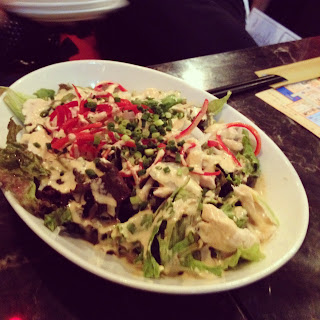
サッカーも飽きた頃にきました。
デビルチキン
確かに激辛です。
まあ殺人春雨よりはらくちんでした。
が、サタンソースが口につくと異様に痛い。

で、その後は焼き肉を食べに、一本ホルモン?
たべて
しめに別のお店で、なま親子丼?食べました。
写真がなんか同期されてないので、みせません!
以上、おなかがきつくなった一日でした。
なんかガリガリ君のキャンペーンやってました。
パルコの前です。ただかなっと
てくてくしましたが、有料でした。
ちなみに地元の商品です。ガリガリ君

ここの店が目的のとろでしたが、時既に遅し。
辛いのは大好きなので挑戦しにいきたかった。。。

ほんで、しゃあないんで、渋谷の肉横町に。
ここはデビルチキン
ほんで、しゃあないんで、デビルチキンのサタンソースを注文

こんなんでした。

最初はサラダを。んまい

デビルチキンこねえ。
なんと1羽やくので50分待てと…。なげえよ
ということで、ほかのお店が大量に入っている横町では
出前が可能でした。
クワトロとベーコンを


あんまりこないので、サービスきた
めっちゃんまい

サッカーやってましたね今日。
中国戦。
開始3分で先制され、逆転し、同点で終わるという
なんともなさけない展開でした。
そしてこれが殺人的な辛さの春雨。
タイ料理みたいですね。

サッカーも飽きた頃にきました。
デビルチキン
確かに激辛です。
まあ殺人春雨よりはらくちんでした。
が、サタンソースが口につくと異様に痛い。

で、その後は焼き肉を食べに、一本ホルモン?
たべて
しめに別のお店で、なま親子丼?食べました。
写真がなんか同期されてないので、みせません!
以上、おなかがきつくなった一日でした。
2013年5月30日木曜日
evernoteからブログを作成できるおもしろいサイト見つけました
Postach.ioというサービスです。
evernoteを使用するのですが、指定のノートブックにてノートをとり、タグにpublishedを使用することで自動的にブログとしてアップされるサービスです。
そのままブログを作成すればいいではないかと思うのですが、これはこれで使ってみると便利。
evernoteを頻繁に使用するので、こういうサービスはありがたいですね。実験的に記事を書いてみました。
http://syuntatata.postach.io/
evernoteを使用するのですが、指定のノートブックにてノートをとり、タグにpublishedを使用することで自動的にブログとしてアップされるサービスです。
そのままブログを作成すればいいではないかと思うのですが、これはこれで使ってみると便利。
evernoteを頻繁に使用するので、こういうサービスはありがたいですね。実験的に記事を書いてみました。
http://syuntatata.postach.io/
2013年3月31日日曜日
やっぱ自転車かっこいいな
もう4月になりますね。
はやいはやい。。。
さくらは散り始め、会社の花見の時期には青々としていることでしょう。
例年よりはやくやってる所も多いみたいですけど。
イオンの自転車屋さんに初めていってみました。案外自転車取り扱ってる数が多くて、興奮しちゃいました。自転車ですぐいける距離なので、こんどからすぐに行けます。
3万から5万くらいで買えるんですね。色んな色があって洒落てますよね。ずいぶん安く買えるもんなのですね。

もう一台くらい買って気軽に乗れる奴ほしいです。あんまり高いと、自由に乗り降りできなくて。たしょう雑に扱えて、味がでたほうがいい感じですよね。
で、イオン行く途中に桜並木がありまして、おお!と思ったので激写!!
激写ってどういう意味だろう。
普通に撮りました。
やっぱり写真撮り慣れてない上に、下手くそなので、この延々と続きそうな並木道が伝ることなさそうな画で残念です。
写真うまい人には素直に尊敬します。

こういうのが一番欲しい。けど高い。。。
はやいはやい。。。
さくらは散り始め、会社の花見の時期には青々としていることでしょう。
例年よりはやくやってる所も多いみたいですけど。
イオンの自転車屋さんに初めていってみました。案外自転車取り扱ってる数が多くて、興奮しちゃいました。自転車ですぐいける距離なので、こんどからすぐに行けます。
3万から5万くらいで買えるんですね。色んな色があって洒落てますよね。ずいぶん安く買えるもんなのですね。
もう一台くらい買って気軽に乗れる奴ほしいです。あんまり高いと、自由に乗り降りできなくて。たしょう雑に扱えて、味がでたほうがいい感じですよね。
で、イオン行く途中に桜並木がありまして、おお!と思ったので激写!!
激写ってどういう意味だろう。
普通に撮りました。
やっぱり写真撮り慣れてない上に、下手くそなので、この延々と続きそうな並木道が伝ることなさそうな画で残念です。
写真うまい人には素直に尊敬します。

自転車のパーツもパソコンも欲しいなあ。
このタイヤなんか格好良いけど、くそたけえw
こういうのが一番欲しい。けど高い。。。
2013年2月10日日曜日
行田 忍城いってきた
せっかくの連休だし、のぼうの城みたんで、忍城をみてこようと出かけて参りました。
あと数キロの所でパンク…
変なさびきった鉄板の上を走ってしまい、でっかい穴が空いた。
歩道なんてろくなもんじゃない。だらだらと走ってたんで歩道に入ったんだけど
それが運の尽き
まるで銃声のような音が響くパンク劇
パンク修理キットもってない気がしたんだけど、とりあえずどんな具合か調べるんで道端に移動しました。
びろ~んって

たまたま修理キット入ってたんで、応急処置。近くの病院の先生がなんか持ってこようか
なんて話しかけてくれたんで、空気入れをお願いしました。
したら白衣きて車で登場。
チャリンコと僕を載せ、ゼリーフライをおごってくれ、忍城をみせてくれ、更には家まで送ってくれるというなんともありがたい施しが。
今度は、君が困ってる人にやってあげなさいと言われ、至れり尽くせりな感じで助けてくれました。
連絡先きいてなかったもんだから、お礼ができない。。。
どうやら先生方はチョコレートを20,30ももらうらしい。お返しケチるのもだせーし、出費がとにかくかさむんで、禁止令だしたいそうで笑
ぼくのやってる意味のわからん仕事の話も聞いてくれ、いいことがないと色々話した。
話してみれば、そんな山ほど嫌なことあったわけじゃないし、そのぶん別の形でいいこと?
もあって、プラマイ0な感じな事に気づいた。
これがいつしかプラスになっていくんだろうなと感じました。
まあできれば、自分の足だけで時間使えれば最高だったけど、赤の他人の僕に親切にしてくれる人に出会えて色々話せてラッキーな経験だった。
あとは、パンクして、30kmも歩いてかえるかなんかするか悩んだ時に、そんな落ち込まなかったのは
いいように自身が変わってんのかなーと思った
なんか道中、飛行機いっぱい飛んでた
妻沼の滑空場だったみたい
上からなんか落としてて、爆弾かと思ってめちゃくちゃ焦った
向かい風続きで相当つらくて、帰りの追い風超楽しみにしてたんだけど堪能できず
まあ、貴重な体験できてよかった。

そうそう。パンクしたときは、超ひと目につくところで修理するか、修理するフリするといいことあるよ
2013年1月20日日曜日
コンソールケーブルのUSB変換
仕事でしか使わないと思うんですけど
スイッチとかストレージの構築する人には必須ですよね。このドライバがなんか上手くインストールできなかった気がするけど、今普通に使えてますね。インストールが面倒だったのは違うやつかな?
仕事はじめたときは、これの使い方もわからず途方に暮れてましたね。だれも教えてくれないし。SANスイッチは、クロスケーブルとこのコネクタで使えて、ciscoのスイッチは、よくあるあの青いストレートケーブルと、このUSB変換で使えました。
最近はようやくcisco触る機会があって、vlan消して、ポートチャネルを組んでNICの冗長性テストとかやりました。割りと簡単にできて、良かったんですが、ほめられましたね、らっきー
netappを今触っているのですが、コントローラーABの両方を同時にモニタするなら2本必要です。まあ大体は1本だけあればことは足りるんですけど、フェイルオーバーさせるテストのときとかは2本あると便利
おわり
スイッチとかストレージの構築する人には必須ですよね。このドライバがなんか上手くインストールできなかった気がするけど、今普通に使えてますね。インストールが面倒だったのは違うやつかな?
仕事はじめたときは、これの使い方もわからず途方に暮れてましたね。だれも教えてくれないし。SANスイッチは、クロスケーブルとこのコネクタで使えて、ciscoのスイッチは、よくあるあの青いストレートケーブルと、このUSB変換で使えました。
最近はようやくcisco触る機会があって、vlan消して、ポートチャネルを組んでNICの冗長性テストとかやりました。割りと簡単にできて、良かったんですが、ほめられましたね、らっきー
netappを今触っているのですが、コントローラーABの両方を同時にモニタするなら2本必要です。まあ大体は1本だけあればことは足りるんですけど、フェイルオーバーさせるテストのときとかは2本あると便利
おわり
登録:
投稿 (Atom)